Showing posts with label Redistribution. Show all posts

Monday, October 28, 2013

Redistribution Between RIP and OSPF


Objectives


• Review configuration and verification of RIP and OSPF.
• Configure passive interfaces in both RIP and OSPF.
• Filter routing updates using distribute lists.
• Redistribute static routes into RIP.
• Redistribute RIP routes into OSPF.
• Redistribute OSPF routes into RIP.
• Originate a default route into OSPF.
• Set a default seed metric.
• Modify OSPF external network types.
• Configure summary addresses.


Step 1: Configure loopbacks and assign addresses.


Step 2: Configure RIPv2.


Configuring RIPv2 on a router is fairly simple:
• Type the global configuration command router rip to enter RIP configuration mode.
• Enable RIPv2 with the version 2 command.
• Enter the no auto-summary command to disable automatic summarization at classful network boundaries.
• Add the networks you want using the network network command.

Q : Based on the topology diagram, which major networks need to be advertised into RIP for R1?

Ans : 
 
172.16.0.0/16
192.168.48.0/24
192.168.49.0/24
192.168.50.0/24
192.168.51.0/24
192.168.70.0/24

Q : Which major networks need to be advertised into RIP for R2?

Ans : Only 172.16.0.0/16


Step 3: Configure passive interfaces in RIP.

Q : What are some reasons to prevent RIP from sending updates out a particular interface?

Ans : RIPv2 does not use an adjacency system. Therefore, RIPv2 floods all of its routing updates out of its interfaces rather than developing adjacencies with short hello packets like EIGRP and OSPF. Because RIPv2 could flood packets out interfaces where there are no RIPv2 receivers, it is a best practice to prevent RIP packets from being sent out these interfaces.

 Q : Does RIPv2 send advertisements out loopback interfaces?

 Ans : By default, loopback interfaces act like normal interfaces in RIPv2 when sending and receiving packets. However, a router will never have RIPv2 neighbors out its loopback interface, so loopback interfaces can always be configured as passive interfaces, thereby saving CPU resources.


Step 4: Summarize a supernet with RIP. 

Q : Which RIP routes should you summarize because they are contiguous and which mask should you use?

Ans : Summarize 192.168.48.0/24 through 192.168.51.0/24. Use a 22-bit mask to create the supernet.


Q : Will this route to Null0 affect routing to prefixes with longer addresses on R1? Explain.

Ans : The routing table first matches based on longest IP prefix. If any of the summarized networks are routable on R1, as in this situation, R1 uses the connected route with the longer mask to reach those networks. If one of those interfaces were to be shut down, R1 would send traffic for that network to its Null0 virtual interface.

Step 5: Suppress routes using prefix lists.

Q : Why would you want to filter updates being sent out or coming in?

Ans : The intention is to summarize addresses at R1, achieving benefits such as smaller routing tables and the prevention of route flapping disturbing network stability. By redistributing the static route into RIPv2, only the summary route was added, but the more specific routes were not filtered. To achieve these benefits, filter the outgoing routes to R2 by allowing all routes except the 24-bit routes.

Step 6: Configure OSPF.

Q : You can verify this by viewing the output of the show ip route command on R2. Do you see a 192.168.0.0/16 supernet?

Ans :   No, because the network command selects interfaces by IP address. It does not set the exact prefix to be advertised.


Step 7: Configure passive interfaces in OSPF.

Q : How is this different from the RIP version of this command?

Ans : Passive interfaces in RIPv2 prevent outgoing routing information via multicast.
Because OSPF must create an adjacency before sending routing updates, the OSPF version of the passive-interface command prevents sending or processing OSPF packets and, therefore, prevents adjacencies.

Step 8: Allow one-way redistribution.

Step 9: Redistribute between two routing protocols.

Step 10: Set a default seed metric.

Step 11: Change the OSPF external network type.


Q : Where would an external type 1 metric be useful?

Ans : If there are multiple paths through an OSPF domain to an external destination network, use E1 routes so that OSPF will evaluate the shortest cost path. Especially use this option if multiple ASBRs are advertising the same destination network to prevent suboptimal routing.

Q : Where would an external type 2 metric be useful?

Ans : If there is only one ASBR advertising an external route, use E2 routes. In this scenario, use the E1 type even though only one ASBR is advertising the external routes.

Q : Which attributes of the routes changed?

Ans : The external route type has been changed from E2 to E1. The metric, previously 10000, has been incremented to represent the path through the OSPF network to the ASBR.


__________________________________________________________________________________

 Final Device Configuration :

R1#sh running-config
Building configuration...

Current configuration : 1821 bytes
!
version 12.4
service timestamps debug datetime msec
service timestamps log datetime msec
no service password-encryption
!
hostname R1
!
boot-start-marker
boot-end-marker
!
!
no aaa new-model
!
resource policy
!
memory-size iomem 5
ip subnet-zero
no ip icmp rate-limit unreachable
ip cef
ip tcp synwait-time 5
!        
no ip domain lookup
!
interface Loopback0
 ip address 172.16.1.1 255.255.255.0
!
interface Loopback48
 ip address 192.168.48.1 255.255.255.0
!
interface Loopback49
 ip address 192.168.49.1 255.255.255.0
!
interface Loopback50
 ip address 192.168.50.1 255.255.255.0
!
interface Loopback51
 ip address 192.168.51.1 255.255.255.0
!
interface Loopback70
 ip address 192.168.70.1 255.255.255.0
!
interface FastEthernet0/0
 no ip address
 shutdown
 duplex auto
 speed auto
!
interface Serial0/0
 ip address 172.16.12.1 255.255.255.0
 clock rate 64000
!
interface FastEthernet0/1
 no ip address
 shutdown
 duplex auto
 speed auto
!
interface Serial0/1
 no ip address
 shutdown
 clock rate 2000000
!
router rip
 version 2
 redistribute static
 passive-interface default
 no passive-interface Serial0/0
 network 172.16.0.0
 network 192.168.48.0
 network 192.168.49.0
 network 192.168.50.0
 network 192.168.51.0
 network 192.168.70.0
 distribute-list prefix RIP-OUT out Serial0/0
 no auto-summary
!
ip classless
ip route 192.168.48.0 255.255.252.0 Null0
!
no ip http server
no ip http secure-server
!
ip prefix-list RIP-OUT seq 5 permit 192.168.48.0/22
ip prefix-list RIP-OUT seq 10 deny 192.168.48.0/22 le 24
ip prefix-list RIP-OUT seq 15 permit 0.0.0.0/0 le 32
!
control-plane
!
line con 0
 exec-timeout 0 0
 privilege level 15
 logging synchronous
line aux 0
 exec-timeout 0 0
 privilege level 15
 logging synchronous
line vty 0 4
 login
!
!
end

____________________________________________________________________________

R2#show rUNning-config
Building configuration...

Current configuration : 1325 bytes
!
version 12.4
service timestamps debug datetime msec
service timestamps log datetime msec
no service password-encryption
!
hostname R2
!
boot-start-marker
boot-end-marker
!
!
no aaa new-model
!
resource policy
!
memory-size iomem 5
ip subnet-zero
no ip icmp rate-limit unreachable
ip cef
ip tcp synwait-time 5
!        
no ip domain lookup
!
interface Loopback0
 ip address 172.16.2.1 255.255.255.0
!
interface FastEthernet0/0
 no ip address
 shutdown
 duplex auto
 speed auto
!
interface Serial0/0
 bandwidth 64
 ip address 172.16.12.2 255.255.255.0
 clock rate 2000000
!
interface FastEthernet0/1
 no ip address
 shutdown
 duplex auto
 speed auto
!
interface Serial0/1
 ip address 172.16.23.2 255.255.255.0
 clock rate 64000
!
router ospf 1
 log-adjacency-changes
 redistribute rip metric-type 1 subnets
 network 172.16.23.0 0.0.0.255 area 0
 default-information originate
 default-metric 10000
!
router rip
 version 2
 redistribute ospf 1 metric 4
 passive-interface Loopback0
 network 172.16.0.0
 no auto-summary
!
ip classless
!
no ip http server
no ip http secure-server
!
control-plane
!
line con 0
 exec-timeout 0 0
 privilege level 15
 logging synchronous
line aux 0
 exec-timeout 0 0
 privilege level 15
 logging synchronous
line vty 0 4
 login
!        
!
end

______________________________________________________________________

R3#sh running-config
Building configuration...

Current configuration : 1725 bytes
!
version 12.4
service timestamps debug datetime msec
service timestamps log datetime msec
no service password-encryption
!
hostname R3
!
boot-start-marker
boot-end-marker
!
!
no aaa new-model
!
resource policy
!
memory-size iomem 5
ip subnet-zero
no ip icmp rate-limit unreachable
ip cef
ip tcp synwait-time 5
!        
no ip domain lookup
!
interface Loopback0
 ip address 172.16.3.1 255.255.255.0
 ip ospf network point-to-point
!
interface Loopback20
 ip address 192.168.20.1 255.255.255.0
 ip ospf network point-to-point
!
interface Loopback25
 ip address 192.168.25.1 255.255.255.0
 ip ospf network point-to-point
!
interface Loopback30
 ip address 192.168.30.1 255.255.255.0
 ip ospf network point-to-point
!
interface Loopback35
 ip address 192.168.35.1 255.255.255.0
 ip ospf network point-to-point
!
interface Loopback40
 ip address 192.168.40.1 255.255.255.0
 ip ospf network point-to-point
!
interface FastEthernet0/0
 no ip address
 shutdown
 duplex auto
 speed auto
!
interface Serial0/0
 bandwidth 64
 ip address 172.16.23.3 255.255.255.0
 clock rate 2000000
!
interface FastEthernet0/1
 no ip address
 shutdown
 duplex auto
 speed auto
!
interface Serial0/1
 no ip address
 shutdown
 clock rate 2000000
!
router ospf 1
 log-adjacency-changes
 passive-interface default
 no passive-interface Serial0/0
 network 172.16.0.0 0.0.255.255 area 0
 network 192.168.0.0 0.0.255.255 area 0
 default-metric 10000
!
ip classless
!
no ip http server
no ip http secure-server
!
control-plane
!
line con 0
 exec-timeout 0 0
 privilege level 15
 logging synchronous
line aux 0
 exec-timeout 0 0
 privilege level 15
 logging synchronous
line vty 0 4
 login
!
!
end


====================================


Monday, October 21, 2013

Advanced Redistribution Lab


Objectives:


1. Configure EIGRP and OSPF for the network shown (use OSPF Area 0). Advertise all networks on all routers. Do not implement any summarization features for EIGRP or OSPF. Routes should never be advertised in both OSPF and EIGRP routing domains.

2. Enable full, mutual redistribution on R2 and R3 between OSPF and EIGRP. The 10.4.0.0/24 and 10.4.1.0/24 subnets should have a seed metric of 100 and an OSPF tag of 10 while the 10.4.2.0/24 and 10.4.3.0/24 subnets should have a seed metric of 200 and an OSPF tag of 20. All other subnets redistributed into OSPF should have a seed metric of 300 and an OSPF tag of 30. OSPF routes redistributed into EIGRP should have a seed metric of BW: 400 DLY: 20 REL: 255 LD: 1 MTU: 1500 and a tag of 40. Finally, external OSPF routes should not increment their metric as they pass through the OSPF domain.


3. Ensure the 10.4.4.0/24 network does not reach the OSPF routing domain.


4. Enable filtering using the assigned route tags to ensure redistributed routes do not cause any looping issues.


5. R3 has the preferred route to reach the 10.1.0.0/24 network. Ensure routers prefer this path over the path from R2.


Final Device Configuration :

R1#sh running-config
Building configuration...

Current configuration : 1164 bytes
!
version 12.4
service timestamps debug datetime msec
service timestamps log datetime msec
no service password-encryption
!
hostname R1
!
boot-start-marker
boot-end-marker
!
no aaa new-model
!
resource policy
!
memory-size iomem 5
ip subnet-zero
ip cef
!
no ip domain lookup
ip domain name lab.local
!   
interface Loopback0
 ip address 10.1.0.1 255.255.255.0
 ip ospf network point-to-point
!
interface FastEthernet0/0
 no ip address
 shutdown
 duplex auto
 speed auto
!
interface Serial0/0
 ip address 10.1.12.1 255.255.255.0
 clock rate 2000000
!
interface FastEthernet0/1
 no ip address
 shutdown
 duplex auto
 speed auto
!
interface Serial0/1
 ip address 10.1.13.1 255.255.255.0
 clock rate 2000000
!
router ospf 1
 log-adjacency-changes
 network 10.1.0.0 0.0.0.255 area 0
 network 10.1.12.0 0.0.0.255 area 0
 network 10.1.13.0 0.0.0.255 area 0
!
ip classless
!
no ip http server
no ip http secure-server
!
control-plane
!
line con 0
 exec-timeout 0 0
 privilege level 15
 logging synchronous
line aux 0
 exec-timeout 0 0
 privilege level 15
 logging synchronous
line vty 0 4
 login
!
!
end
======================================================
R2#sh running-config
Building configuration...

Current configuration : 2031 bytes
!
version 12.4
service timestamps debug datetime msec
service timestamps log datetime msec
no service password-encryption
!
hostname R2
!
boot-start-marker
boot-end-marker
!
no aaa new-model
!
resource policy
!
memory-size iomem 5
ip subnet-zero
ip cef
!
no ip domain lookup
ip domain name lab.local
!
interface FastEthernet0/0
 no ip address
 shutdown
 duplex auto
 speed auto
!
interface Serial0/0
 ip address 10.1.12.2 255.255.255.0
 clock rate 2000000
!
interface FastEthernet0/1
 no ip address
 shutdown
 duplex auto
 speed auto
!
interface Serial0/1
 ip address 10.1.23.2 255.255.255.0
 clock rate 2000000
!
interface Serial0/2
 ip address 10.1.24.2 255.255.255.0
 clock rate 2000000
!
interface Serial0/3
 no ip address
 shutdown
 clock rate 2000000
!
router eigrp 100
 redistribute ospf 1 route-map OSPF-TO-EIGRP
 network 10.1.23.0 0.0.0.255
 network 10.1.24.0 0.0.0.255
 distance eigrp 90 105
 no auto-summary
!
router ospf 1
 log-adjacency-changes
 redistribute eigrp 100 subnets route-map EIGRP-TO-OSPF
 network 10.1.12.0 0.0.0.255 area 0
!
ip classless
!
!
no ip http server
no ip http secure-server
!
access-list 1 permit 10.4.0.0 0.0.0.255
access-list 1 permit 10.4.1.0 0.0.0.255
access-list 2 permit 10.4.2.0 0.0.0.255
access-list 2 permit 10.4.3.0 0.0.0.255
access-list 3 permit 10.4.4.0 0.0.0.255
route-map EIGRP-TO-OSPF deny 5
 match tag 40
!
route-map EIGRP-TO-OSPF permit 10
 match ip address 1
 set metric 100
 set tag 10
!
route-map EIGRP-TO-OSPF permit 20
 match ip address 2
 set metric 200
 set tag 20
!
route-map EIGRP-TO-OSPF deny 30
 match ip address 3
!
route-map EIGRP-TO-OSPF permit 40
 set metric 300
 set tag 30
!
route-map OSPF-TO-EIGRP deny 5
 match tag 10 20 30
!
route-map OSPF-TO-EIGRP permit 10
 set metric 400 20 255 1 1500
 set tag 40
!
control-plane
!        
line con 0
 exec-timeout 0 0
 privilege level 15
 logging synchronous
line aux 0
 exec-timeout 0 0
 privilege level 15
 logging synchronous
line vty 0 4
 login
!
!
end
========================================================
R3#sh running-config
Building configuration...

Current configuration : 1834 bytes
!
version 12.4
service timestamps debug datetime msec
service timestamps log datetime msec
no service password-encryption
!
hostname R3
!
boot-start-marker
boot-end-marker
!
no aaa new-model
!
resource policy
!
memory-size iomem 5
ip subnet-zero
ip cef
!
no ip domain lookup
ip domain name lab.local
!       
interface FastEthernet0/0
 no ip address
 shutdown
 duplex auto
 speed auto
!
interface Serial0/0
 ip address 10.1.13.3 255.255.255.0
 clock rate 2000000
!
interface FastEthernet0/1
 no ip address
 shutdown
 duplex auto
 speed auto
!
interface Serial0/1
 ip address 10.1.23.3 255.255.255.0
 clock rate 2000000
!
router eigrp 100
 redistribute ospf 1 route-map OSPF-TO-EIGRP
 network 10.1.23.0 0.0.0.255
 no auto-summary
!
router ospf 1
 log-adjacency-changes
 redistribute eigrp 100 subnets route-map EIGRP-TO-OSPF
 network 10.1.13.0 0.0.0.255 area 0
!
ip classless
!
no ip http server
no ip http secure-server
!
access-list 1 permit 10.4.0.0 0.0.0.255
access-list 1 permit 10.4.1.0 0.0.0.255
access-list 2 permit 10.4.2.0 0.0.0.255
access-list 2 permit 10.4.3.0 0.0.0.255
access-list 3 permit 10.4.4.0 0.0.0.255
route-map EIGRP-TO-OSPF deny 5
 match tag 40
!
route-map EIGRP-TO-OSPF permit 10
 match ip address 1
 set metric 100
 set tag 10
!
route-map EIGRP-TO-OSPF permit 20
 match ip address 2
 set metric 200
 set tag 20
!
route-map EIGRP-TO-OSPF deny 30
 match ip address 3
!
route-map EIGRP-TO-OSPF permit 40
 set metric 300
 set tag 30
!
route-map OSPF-TO-EIGRP deny 5
 match tag 10 20 30
!
route-map OSPF-TO-EIGRP permit 10
 set metric 400 20 255 1 1500
 set tag 40
!
control-plane
!
line con 0
 exec-timeout 0 0
 privilege level 15
 logging synchronous
line aux 0
 exec-timeout 0 0
 privilege level 15
 logging synchronous
line vty 0 4
 login
!        
!
end
=======================================================
R4#sh running-config
Building configuration...

Current configuration : 1257 bytes
!
version 12.4
service timestamps debug datetime msec
service timestamps log datetime msec
no service password-encryption
!
hostname R4
!
boot-start-marker
boot-end-marker
!
no aaa new-model
!
resource policy
!
memory-size iomem 5
ip subnet-zero
ip cef
!
no ip domain lookup
ip domain name lab.local
!        
interface Loopback0
 ip address 10.4.0.1 255.255.255.0
!
interface Loopback1
 ip address 10.4.1.1 255.255.255.0
!
interface Loopback2
 ip address 10.4.2.1 255.255.255.0
!
interface Loopback3
 ip address 10.4.3.1 255.255.255.0
!
interface Loopback4
 ip address 10.4.4.1 255.255.255.0
!
interface FastEthernet0/0
 no ip address
 shutdown
 duplex auto
 speed auto
!
interface Serial0/0
 ip address 10.1.24.4 255.255.255.0
 clock rate 2000000
!
interface FastEthernet0/1
 no ip address
 shutdown
 duplex auto
 speed auto
!
interface Serial0/1
 no ip address
 shutdown
 clock rate 2000000
!
router eigrp 100
 network 10.0.0.0
 no auto-summary
!
ip classless
!
no ip http server
no ip http secure-server
!        
control-plane
!
line con 0
 exec-timeout 0 0
 privilege level 15
 logging synchronous
line aux 0
 exec-timeout 0 0
 privilege level 15
 logging synchronous
line vty 0 4
 login   
!
!
end
=======================================================
with regards,
Zaw Min Htann

Thursday, October 17, 2013

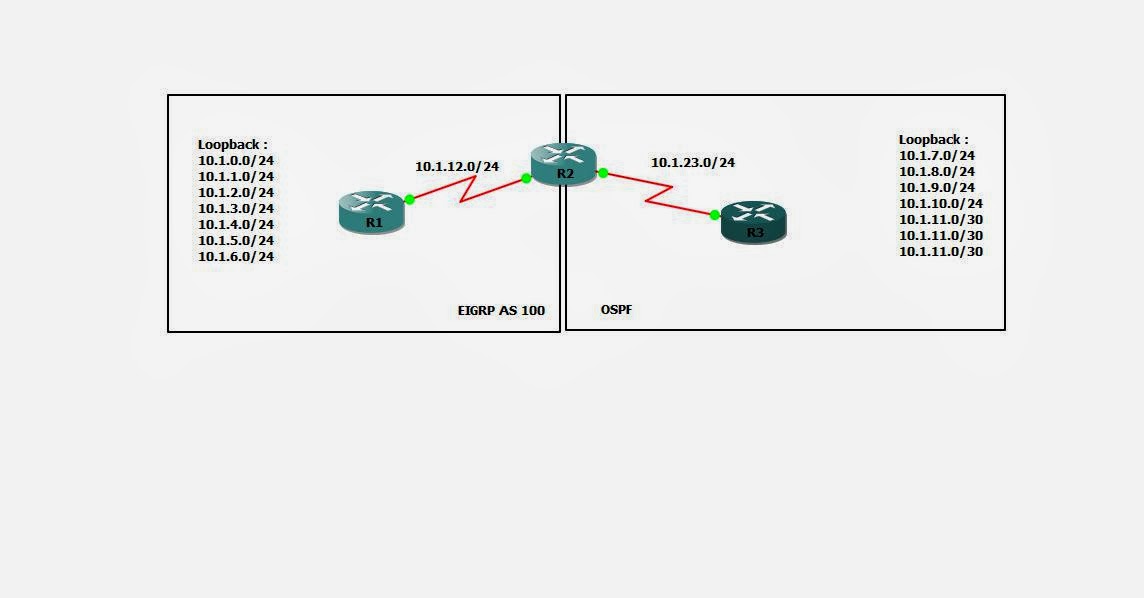
Simple Redistribution


Objectives:


1. Configure EIGRP and OSPF for the network shown. Advertise all networks on all routers. Do not implement any summarization features for EIGRP or OSPF. Use Area 0 for the OSPF portion of the network and configure all Loopback interfaces on R3 as a point-to-point OSPF network.

2. Enable full redistribution between OSPF and EIGRP, implementing any necessary seed metrics to ensure all routers are able to see all routes. OSPF external routes should not increment their metric as they propagate the network.

3. Implement distribute-list filtering in such a way that the OSPF domain only sees odd numbered loopback networks coming from R1. Any even numbered subnet (including physical networks) should be hidden from OSPF.

4. Implement route-map filtering in such a way that the EIGRP domain does not see routes with a more specific subnet mask than /24.

Devices Configuration :


R1#sh running-config
Building configuration...

Current configuration : 1371 bytes
!
version 12.4
service timestamps debug datetime msec
service timestamps log datetime msec
no service password-encryption
!
hostname R1
!
boot-start-marker
boot-end-marker
!
!
no aaa new-model
!
resource policy
!
memory-size iomem 5
ip subnet-zero
ip cef
!
no ip domain lookup
ip domain name lab.local
!        
interface Loopback0
 ip address 10.1.0.1 255.255.255.0
!
interface Loopback1
 ip address 10.1.1.1 255.255.255.0
!
interface Loopback2
 ip address 10.1.2.1 255.255.255.0
!
interface Loopback3
 ip address 10.1.3.1 255.255.255.0
!
interface Loopback4
 ip address 10.1.4.1 255.255.255.0
!
interface Loopback5
 ip address 10.1.5.1 255.255.255.0
!
interface Loopback6
 ip address 10.1.6.1 255.255.255.0
!
interface FastEthernet0/0
 no ip address
 shutdown
 duplex auto
 speed auto
!
interface Serial0/0
 ip address 10.1.12.1 255.255.255.0
 clock rate 2000000
!
interface FastEthernet0/1
 no ip address
 shutdown
 duplex auto
 speed auto
!
interface Serial0/1
 no ip address
 shutdown
 clock rate 2000000
!
router eigrp 100
 network 10.0.0.0
 no auto-summary
!        
ip classless
!
!
no ip http server
no ip http secure-server
!
control-plane
!
line con 0
 exec-timeout 0 0
 privilege level 15
 logging synchronous
line aux 0
 exec-timeout 0 0
 privilege level 15
 logging synchronous
line vty 0 4
 login
!
!
end

=========================================================================
R2#sh running-config
Building configuration...

Current configuration : 1466 bytes
!
version 12.4
service timestamps debug datetime msec
service timestamps log datetime msec
no service password-encryption
!
hostname R2
!
boot-start-marker
boot-end-marker
!
!
no aaa new-model
!
resource policy
!
memory-size iomem 5
ip subnet-zero
ip cef
!
!
!        
!
no ip domain lookup
ip domain name lab.local
!        
interface FastEthernet0/0
 no ip address
 shutdown
 duplex auto
 speed auto
!
interface Serial0/0
 ip address 10.1.12.2 255.255.255.0
 clock rate 2000000
!
interface FastEthernet0/1
 no ip address
 shutdown
 duplex auto
 speed auto
!
interface Serial0/1
 ip address 10.1.23.2 255.255.255.0
 clock rate 2000000
!
router eigrp 100
 redistribute ospf 1 metric 100 100 100 100 100 route-map FILTER_OSPF_TO_EIGRP
 network 10.1.12.0 0.0.0.255
 no auto-summary
!
router ospf 1
 log-adjacency-changes
 redistribute eigrp 100 metric 100 subnets
 network 10.1.23.0 0.0.0.255 area 0
 distribute-list 1 out
!
ip classless
!
!
no ip http server
no ip http secure-server
!
ip prefix-list CISCO seq 5 permit 10.0.0.0/8 le 24
access-list 1 permit 10.1.1.0 0.0.0.255
access-list 1 permit 10.1.3.0 0.0.0.255
access-list 1 permit 10.1.5.0 0.0.0.255
route-map FILTER_OSPF_TO_EIGRP permit 10
 match ip address prefix-list CISCO
!
control-plane
!
line con 0
 exec-timeout 0 0
 privilege level 15
 logging synchronous
line aux 0
 exec-timeout 0 0
 privilege level 15
 logging synchronous
line vty 0 4
 login
!        
!
end
=========================================================================
R3#sh running-config
Building configuration...

Current configuration : 1629 bytes
!
version 12.4
service timestamps debug datetime msec
service timestamps log datetime msec
no service password-encryption
!
hostname R3
!
boot-start-marker
boot-end-marker
!
!
no aaa new-model
!
resource policy
!
memory-size iomem 5
ip subnet-zero
ip cef
!       
no ip domain lookup
ip domain name lab.local
!        
interface Loopback0
 ip address 10.1.7.1 255.255.255.0
 ip ospf network point-to-point
!
interface Loopback1
 ip address 10.1.8.1 255.255.255.0
 ip ospf network point-to-point
!
interface Loopback2
 ip address 10.1.9.1 255.255.255.0
 ip ospf network point-to-point
!        
interface Loopback3
 ip address 10.1.10.1 255.255.255.0
 ip ospf network point-to-point
!
interface Loopback4
 ip address 10.1.11.1 255.255.255.252
 ip ospf network point-to-point
!
interface Loopback5
 ip address 10.1.11.5 255.255.255.252
 ip ospf network point-to-point
!
interface Loopback6
 ip address 10.1.11.9 255.255.255.252
 ip ospf network point-to-point
!
interface FastEthernet0/0
 no ip address
 shutdown
 duplex auto
 speed auto
!
interface Serial0/0
 ip address 10.1.23.3 255.255.255.0
 clock rate 2000000
!
interface FastEthernet0/1
 no ip address
 shutdown
 duplex auto
 speed auto
!
interface Serial0/1
 no ip address
 shutdown
 clock rate 2000000
!
router ospf 1
 log-adjacency-changes
 network 10.0.0.0 0.255.255.255 area 0
!
ip classless
!
no ip http server
no ip http secure-server
!
control-plane
!
line con 0
 exec-timeout 0 0
 privilege level 15
 logging synchronous
line aux 0
 exec-timeout 0 0
 privilege level 15
 logging synchronous
line vty 0 4
 login
!
!
end