Monday, October 21, 2013

Advanced Redistribution Lab


Objectives:


1. Configure EIGRP and OSPF for the network shown (use OSPF Area 0). Advertise all networks on all routers. Do not implement any summarization features for EIGRP or OSPF. Routes should never be advertised in both OSPF and EIGRP routing domains.

2. Enable full, mutual redistribution on R2 and R3 between OSPF and EIGRP. The 10.4.0.0/24 and 10.4.1.0/24 subnets should have a seed metric of 100 and an OSPF tag of 10 while the 10.4.2.0/24 and 10.4.3.0/24 subnets should have a seed metric of 200 and an OSPF tag of 20. All other subnets redistributed into OSPF should have a seed metric of 300 and an OSPF tag of 30. OSPF routes redistributed into EIGRP should have a seed metric of BW: 400 DLY: 20 REL: 255 LD: 1 MTU: 1500 and a tag of 40. Finally, external OSPF routes should not increment their metric as they pass through the OSPF domain.


3. Ensure the 10.4.4.0/24 network does not reach the OSPF routing domain.


4. Enable filtering using the assigned route tags to ensure redistributed routes do not cause any looping issues.


5. R3 has the preferred route to reach the 10.1.0.0/24 network. Ensure routers prefer this path over the path from R2.


Final Device Configuration :

R1#sh running-config
Building configuration...

Current configuration : 1164 bytes
!
version 12.4
service timestamps debug datetime msec
service timestamps log datetime msec
no service password-encryption
!
hostname R1
!
boot-start-marker
boot-end-marker
!
no aaa new-model
!
resource policy
!
memory-size iomem 5
ip subnet-zero
ip cef
!
no ip domain lookup
ip domain name lab.local
!   
interface Loopback0
 ip address 10.1.0.1 255.255.255.0
 ip ospf network point-to-point
!
interface FastEthernet0/0
 no ip address
 shutdown
 duplex auto
 speed auto
!
interface Serial0/0
 ip address 10.1.12.1 255.255.255.0
 clock rate 2000000
!
interface FastEthernet0/1
 no ip address
 shutdown
 duplex auto
 speed auto
!
interface Serial0/1
 ip address 10.1.13.1 255.255.255.0
 clock rate 2000000
!
router ospf 1
 log-adjacency-changes
 network 10.1.0.0 0.0.0.255 area 0
 network 10.1.12.0 0.0.0.255 area 0
 network 10.1.13.0 0.0.0.255 area 0
!
ip classless
!
no ip http server
no ip http secure-server
!
control-plane
!
line con 0
 exec-timeout 0 0
 privilege level 15
 logging synchronous
line aux 0
 exec-timeout 0 0
 privilege level 15
 logging synchronous
line vty 0 4
 login
!
!
end
======================================================
R2#sh running-config
Building configuration...

Current configuration : 2031 bytes
!
version 12.4
service timestamps debug datetime msec
service timestamps log datetime msec
no service password-encryption
!
hostname R2
!
boot-start-marker
boot-end-marker
!
no aaa new-model
!
resource policy
!
memory-size iomem 5
ip subnet-zero
ip cef
!
no ip domain lookup
ip domain name lab.local
!
interface FastEthernet0/0
 no ip address
 shutdown
 duplex auto
 speed auto
!
interface Serial0/0
 ip address 10.1.12.2 255.255.255.0
 clock rate 2000000
!
interface FastEthernet0/1
 no ip address
 shutdown
 duplex auto
 speed auto
!
interface Serial0/1
 ip address 10.1.23.2 255.255.255.0
 clock rate 2000000
!
interface Serial0/2
 ip address 10.1.24.2 255.255.255.0
 clock rate 2000000
!
interface Serial0/3
 no ip address
 shutdown
 clock rate 2000000
!
router eigrp 100
 redistribute ospf 1 route-map OSPF-TO-EIGRP
 network 10.1.23.0 0.0.0.255
 network 10.1.24.0 0.0.0.255
 distance eigrp 90 105
 no auto-summary
!
router ospf 1
 log-adjacency-changes
 redistribute eigrp 100 subnets route-map EIGRP-TO-OSPF
 network 10.1.12.0 0.0.0.255 area 0
!
ip classless
!
!
no ip http server
no ip http secure-server
!
access-list 1 permit 10.4.0.0 0.0.0.255
access-list 1 permit 10.4.1.0 0.0.0.255
access-list 2 permit 10.4.2.0 0.0.0.255
access-list 2 permit 10.4.3.0 0.0.0.255
access-list 3 permit 10.4.4.0 0.0.0.255
route-map EIGRP-TO-OSPF deny 5
 match tag 40
!
route-map EIGRP-TO-OSPF permit 10
 match ip address 1
 set metric 100
 set tag 10
!
route-map EIGRP-TO-OSPF permit 20
 match ip address 2
 set metric 200
 set tag 20
!
route-map EIGRP-TO-OSPF deny 30
 match ip address 3
!
route-map EIGRP-TO-OSPF permit 40
 set metric 300
 set tag 30
!
route-map OSPF-TO-EIGRP deny 5
 match tag 10 20 30
!
route-map OSPF-TO-EIGRP permit 10
 set metric 400 20 255 1 1500
 set tag 40
!
control-plane
!        
line con 0
 exec-timeout 0 0
 privilege level 15
 logging synchronous
line aux 0
 exec-timeout 0 0
 privilege level 15
 logging synchronous
line vty 0 4
 login
!
!
end
========================================================
R3#sh running-config
Building configuration...

Current configuration : 1834 bytes
!
version 12.4
service timestamps debug datetime msec
service timestamps log datetime msec
no service password-encryption
!
hostname R3
!
boot-start-marker
boot-end-marker
!
no aaa new-model
!
resource policy
!
memory-size iomem 5
ip subnet-zero
ip cef
!
no ip domain lookup
ip domain name lab.local
!       
interface FastEthernet0/0
 no ip address
 shutdown
 duplex auto
 speed auto
!
interface Serial0/0
 ip address 10.1.13.3 255.255.255.0
 clock rate 2000000
!
interface FastEthernet0/1
 no ip address
 shutdown
 duplex auto
 speed auto
!
interface Serial0/1
 ip address 10.1.23.3 255.255.255.0
 clock rate 2000000
!
router eigrp 100
 redistribute ospf 1 route-map OSPF-TO-EIGRP
 network 10.1.23.0 0.0.0.255
 no auto-summary
!
router ospf 1
 log-adjacency-changes
 redistribute eigrp 100 subnets route-map EIGRP-TO-OSPF
 network 10.1.13.0 0.0.0.255 area 0
!
ip classless
!
no ip http server
no ip http secure-server
!
access-list 1 permit 10.4.0.0 0.0.0.255
access-list 1 permit 10.4.1.0 0.0.0.255
access-list 2 permit 10.4.2.0 0.0.0.255
access-list 2 permit 10.4.3.0 0.0.0.255
access-list 3 permit 10.4.4.0 0.0.0.255
route-map EIGRP-TO-OSPF deny 5
 match tag 40
!
route-map EIGRP-TO-OSPF permit 10
 match ip address 1
 set metric 100
 set tag 10
!
route-map EIGRP-TO-OSPF permit 20
 match ip address 2
 set metric 200
 set tag 20
!
route-map EIGRP-TO-OSPF deny 30
 match ip address 3
!
route-map EIGRP-TO-OSPF permit 40
 set metric 300
 set tag 30
!
route-map OSPF-TO-EIGRP deny 5
 match tag 10 20 30
!
route-map OSPF-TO-EIGRP permit 10
 set metric 400 20 255 1 1500
 set tag 40
!
control-plane
!
line con 0
 exec-timeout 0 0
 privilege level 15
 logging synchronous
line aux 0
 exec-timeout 0 0
 privilege level 15
 logging synchronous
line vty 0 4
 login
!        
!
end
=======================================================
R4#sh running-config
Building configuration...

Current configuration : 1257 bytes
!
version 12.4
service timestamps debug datetime msec
service timestamps log datetime msec
no service password-encryption
!
hostname R4
!
boot-start-marker
boot-end-marker
!
no aaa new-model
!
resource policy
!
memory-size iomem 5
ip subnet-zero
ip cef
!
no ip domain lookup
ip domain name lab.local
!        
interface Loopback0
 ip address 10.4.0.1 255.255.255.0
!
interface Loopback1
 ip address 10.4.1.1 255.255.255.0
!
interface Loopback2
 ip address 10.4.2.1 255.255.255.0
!
interface Loopback3
 ip address 10.4.3.1 255.255.255.0
!
interface Loopback4
 ip address 10.4.4.1 255.255.255.0
!
interface FastEthernet0/0
 no ip address
 shutdown
 duplex auto
 speed auto
!
interface Serial0/0
 ip address 10.1.24.4 255.255.255.0
 clock rate 2000000
!
interface FastEthernet0/1
 no ip address
 shutdown
 duplex auto
 speed auto
!
interface Serial0/1
 no ip address
 shutdown
 clock rate 2000000
!
router eigrp 100
 network 10.0.0.0
 no auto-summary
!
ip classless
!
no ip http server
no ip http secure-server
!        
control-plane
!
line con 0
 exec-timeout 0 0
 privilege level 15
 logging synchronous
line aux 0
 exec-timeout 0 0
 privilege level 15
 logging synchronous
line vty 0 4
 login   
!
!
end
=======================================================
with regards,
Zaw Min Htann

Thursday, October 17, 2013

Simple Redistribution


Objectives:


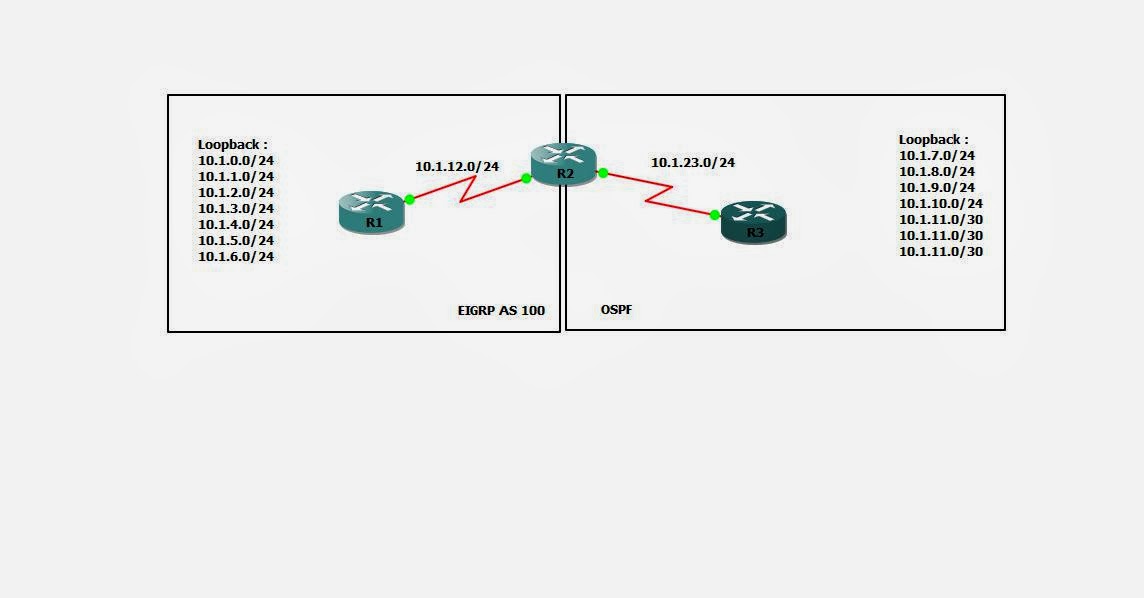
1. Configure EIGRP and OSPF for the network shown. Advertise all networks on all routers. Do not implement any summarization features for EIGRP or OSPF. Use Area 0 for the OSPF portion of the network and configure all Loopback interfaces on R3 as a point-to-point OSPF network.

2. Enable full redistribution between OSPF and EIGRP, implementing any necessary seed metrics to ensure all routers are able to see all routes. OSPF external routes should not increment their metric as they propagate the network.

3. Implement distribute-list filtering in such a way that the OSPF domain only sees odd numbered loopback networks coming from R1. Any even numbered subnet (including physical networks) should be hidden from OSPF.

4. Implement route-map filtering in such a way that the EIGRP domain does not see routes with a more specific subnet mask than /24.

Devices Configuration :


R1#sh running-config
Building configuration...

Current configuration : 1371 bytes
!
version 12.4
service timestamps debug datetime msec
service timestamps log datetime msec
no service password-encryption
!
hostname R1
!
boot-start-marker
boot-end-marker
!
!
no aaa new-model
!
resource policy
!
memory-size iomem 5
ip subnet-zero
ip cef
!
no ip domain lookup
ip domain name lab.local
!        
interface Loopback0
 ip address 10.1.0.1 255.255.255.0
!
interface Loopback1
 ip address 10.1.1.1 255.255.255.0
!
interface Loopback2
 ip address 10.1.2.1 255.255.255.0
!
interface Loopback3
 ip address 10.1.3.1 255.255.255.0
!
interface Loopback4
 ip address 10.1.4.1 255.255.255.0
!
interface Loopback5
 ip address 10.1.5.1 255.255.255.0
!
interface Loopback6
 ip address 10.1.6.1 255.255.255.0
!
interface FastEthernet0/0
 no ip address
 shutdown
 duplex auto
 speed auto
!
interface Serial0/0
 ip address 10.1.12.1 255.255.255.0
 clock rate 2000000
!
interface FastEthernet0/1
 no ip address
 shutdown
 duplex auto
 speed auto
!
interface Serial0/1
 no ip address
 shutdown
 clock rate 2000000
!
router eigrp 100
 network 10.0.0.0
 no auto-summary
!        
ip classless
!
!
no ip http server
no ip http secure-server
!
control-plane
!
line con 0
 exec-timeout 0 0
 privilege level 15
 logging synchronous
line aux 0
 exec-timeout 0 0
 privilege level 15
 logging synchronous
line vty 0 4
 login
!
!
end

=========================================================================
R2#sh running-config
Building configuration...

Current configuration : 1466 bytes
!
version 12.4
service timestamps debug datetime msec
service timestamps log datetime msec
no service password-encryption
!
hostname R2
!
boot-start-marker
boot-end-marker
!
!
no aaa new-model
!
resource policy
!
memory-size iomem 5
ip subnet-zero
ip cef
!
!
!        
!
no ip domain lookup
ip domain name lab.local
!        
interface FastEthernet0/0
 no ip address
 shutdown
 duplex auto
 speed auto
!
interface Serial0/0
 ip address 10.1.12.2 255.255.255.0
 clock rate 2000000
!
interface FastEthernet0/1
 no ip address
 shutdown
 duplex auto
 speed auto
!
interface Serial0/1
 ip address 10.1.23.2 255.255.255.0
 clock rate 2000000
!
router eigrp 100
 redistribute ospf 1 metric 100 100 100 100 100 route-map FILTER_OSPF_TO_EIGRP
 network 10.1.12.0 0.0.0.255
 no auto-summary
!
router ospf 1
 log-adjacency-changes
 redistribute eigrp 100 metric 100 subnets
 network 10.1.23.0 0.0.0.255 area 0
 distribute-list 1 out
!
ip classless
!
!
no ip http server
no ip http secure-server
!
ip prefix-list CISCO seq 5 permit 10.0.0.0/8 le 24
access-list 1 permit 10.1.1.0 0.0.0.255
access-list 1 permit 10.1.3.0 0.0.0.255
access-list 1 permit 10.1.5.0 0.0.0.255
route-map FILTER_OSPF_TO_EIGRP permit 10
 match ip address prefix-list CISCO
!
control-plane
!
line con 0
 exec-timeout 0 0
 privilege level 15
 logging synchronous
line aux 0
 exec-timeout 0 0
 privilege level 15
 logging synchronous
line vty 0 4
 login
!        
!
end
=========================================================================
R3#sh running-config
Building configuration...

Current configuration : 1629 bytes
!
version 12.4
service timestamps debug datetime msec
service timestamps log datetime msec
no service password-encryption
!
hostname R3
!
boot-start-marker
boot-end-marker
!
!
no aaa new-model
!
resource policy
!
memory-size iomem 5
ip subnet-zero
ip cef
!       
no ip domain lookup
ip domain name lab.local
!        
interface Loopback0
 ip address 10.1.7.1 255.255.255.0
 ip ospf network point-to-point
!
interface Loopback1
 ip address 10.1.8.1 255.255.255.0
 ip ospf network point-to-point
!
interface Loopback2
 ip address 10.1.9.1 255.255.255.0
 ip ospf network point-to-point
!        
interface Loopback3
 ip address 10.1.10.1 255.255.255.0
 ip ospf network point-to-point
!
interface Loopback4
 ip address 10.1.11.1 255.255.255.252
 ip ospf network point-to-point
!
interface Loopback5
 ip address 10.1.11.5 255.255.255.252
 ip ospf network point-to-point
!
interface Loopback6
 ip address 10.1.11.9 255.255.255.252
 ip ospf network point-to-point
!
interface FastEthernet0/0
 no ip address
 shutdown
 duplex auto
 speed auto
!
interface Serial0/0
 ip address 10.1.23.3 255.255.255.0
 clock rate 2000000
!
interface FastEthernet0/1
 no ip address
 shutdown
 duplex auto
 speed auto
!
interface Serial0/1
 no ip address
 shutdown
 clock rate 2000000
!
router ospf 1
 log-adjacency-changes
 network 10.0.0.0 0.255.255.255 area 0
!
ip classless
!
no ip http server
no ip http secure-server
!
control-plane
!
line con 0
 exec-timeout 0 0
 privilege level 15
 logging synchronous
line aux 0
 exec-timeout 0 0
 privilege level 15
 logging synchronous
line vty 0 4
 login
!
!
end

Wednesday, October 16, 2013

OSPF Special Area


Objectives:


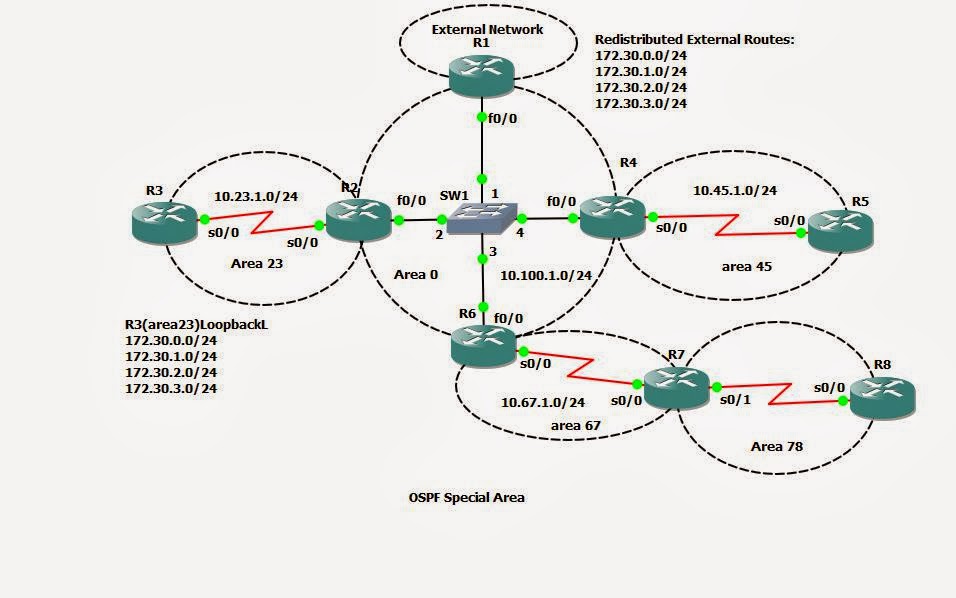
1. Configure basic OSPF for the network shown. Advertise all networks attached to each router into OSPF using the simplest method available. To inject external networks into the OSPF domain, redistribute the static routes on R1. These routes should be marked as type E1.


2. OSPF should never form neighbor relationships on any interface where other OSPF routers do not exist (as shown in the diagram).


3. All routers in Area 0 should use MD5 authentication for OSPF neighbors. Routers in Area 23 should be configured to support clear-text authentication for OSPF neighbors. All keys should be set to the passphrase ‘cisco’ (without quotes).


4. Routers in Area 45 are limited in their capacity and should not receive routes for networks outside the OSPF system. These routers should reach the external network using a default route which cannot be configured statically.


5. Routers in Area 23 must not receive any Type 3, 4, or 5 LSAs from the rest of the OSPF network. These routers should reach the external network using a default route with an initial OSPF cost of 100.


6. When this exercise is complete, all routers should be able to reach (ping) every route in the OSPF routing table


Device Configuration :

R1#sh running-config
Building configuration...

Current configuration : 1371 bytes
!
version 12.4
service timestamps debug datetime msec
service timestamps log datetime msec
no service password-encryption
!
hostname R1
!
boot-start-marker
boot-end-marker
!
no aaa new-model
!
resource policy
!
memory-size iomem 5
ip subnet-zero
ip cef
!
no ip domain lookup
ip domain name lab.local
!    
interface FastEthernet0/0
 ip address 10.100.1.1 255.255.255.0
 ip ospf authentication message-digest
 ip ospf message-digest-key 1 md5 cisco
 duplex auto
 speed auto
!
interface Serial0/0
 no ip address
 shutdown
 clock rate 2000000
!
interface FastEthernet0/1
 no ip address
 shutdown
 duplex auto
 speed auto
!
interface Serial0/1
 no ip address
 shutdown
 clock rate 2000000
!        
router ospf 1
 router-id 1.1.1.1
 log-adjacency-changes
 redistribute static metric 50 metric-type 1 subnets
 passive-interface default
 no passive-interface FastEthernet0/0
 network 10.100.1.0 0.0.0.255 area 0
!
ip classless
ip route 172.31.0.0 255.255.255.0 Null0
ip route 172.31.1.0 255.255.255.0 Null0
ip route 172.31.2.0 255.255.255.0 Null0
ip route 172.31.3.0 255.255.255.0 Null0
!
!
no ip http server
no ip http secure-server
!
control-plane
!        
line con 0
 exec-timeout 0 0
 privilege level 15
 logging synchronous
line aux 0
 exec-timeout 0 0
 privilege level 15
 logging synchronous
line vty 0 4
 login
!
!
end
==================================================================================
R2#sh running-config
Building configuration...

Current configuration : 1589 bytes
!
version 12.4
service timestamps debug datetime msec
service timestamps log datetime msec
no service password-encryption
!
hostname R2
!
boot-start-marker
boot-end-marker
!
!
no aaa new-model
!
resource policy
!
memory-size iomem 5
ip subnet-zero
ip cef
!
no ip domain lookup
ip domain name lab.local

interface Loopback0
 ip address 172.30.0.1 255.255.255.0
!
interface Loopback1
 ip address 172.30.1.1 255.255.255.0
!
interface Loopback2
 ip address 172.30.2.1 255.255.255.0
!
interface Loopback3
 ip address 172.30.3.1 255.255.255.0
!
interface FastEthernet0/0
 ip address 10.100.1.2 255.255.255.0
 ip ospf authentication message-digest
 ip ospf message-digest-key 1 md5 cisco
 duplex auto
 speed auto
!
interface Serial0/0
 ip address 10.23.1.2 255.255.255.0
 ip ospf authentication
 ip ospf authentication-key cisco
 clock rate 2000000
!
interface FastEthernet0/1
 no ip address
 shutdown
 duplex auto
 speed auto
!
interface Serial0/1
 no ip address
 shutdown
 clock rate 2000000
!
router ospf 1
 router-id 2.2.2.2
 log-adjacency-changes
 area 23 stub no-summary
 area 23 default-cost 100
 passive-interface FastEthernet0/1
 passive-interface Serial0/1
 network 10.23.1.0 0.0.0.255 area 23
 network 10.100.1.0 0.0.0.255 area 0
 network 172.30.0.0 0.0.3.255 area 23
!
ip classless
!
!
no ip http server
no ip http secure-server
!
control-plane
!
line con 0
 exec-timeout 0 0
 privilege level 15
 logging synchronous
line aux 0
 exec-timeout 0 0
 privilege level 15
 logging synchronous
line vty 0 4
 login
!
!
end
==================================================================================
R3#sh running-config
Building configuration...

Current configuration : 1144 bytes
!
version 12.4
service timestamps debug datetime msec
service timestamps log datetime msec
no service password-encryption
!
hostname R3
!
boot-start-marker
boot-end-marker
!
!
no aaa new-model
!
resource policy
!
memory-size iomem 5
ip subnet-zero
ip cef
!
no ip domain lookup
ip domain name lab.local
!        
interface FastEthernet0/0
 no ip address
 shutdown
 duplex auto
 speed auto
!
interface Serial0/0
 ip address 10.23.1.3 255.255.255.0
 ip ospf authentication
 ip ospf authentication-key cisco
 clock rate 2000000
!
interface FastEthernet0/1
 no ip address
 shutdown
 duplex auto
 speed auto
!
interface Serial0/1
 no ip address
 shutdown
 clock rate 2000000
!        
router ospf 1
 router-id 3.3.3.3
 log-adjacency-changes
 area 23 stub
 passive-interface default
 no passive-interface Serial0/0
 network 10.23.1.0 0.0.0.255 area 23
!
ip classless
!
no ip http server
no ip http secure-server
!
control-plane
!
line con 0
 exec-timeout 0 0
 privilege level 15
 logging synchronous
line aux 0
 exec-timeout 0 0
 privilege level 15
 logging synchronous
line vty 0 4
 login
!
!
end
==================================================================================
R4#copy running-config startup-config
Destination filename [startup-config]?
Building configuration...
[OK]
R4#sh run
R4#sh running-config
Building configuration...

Current configuration : 1252 bytes
!
version 12.4
service timestamps debug datetime msec
service timestamps log datetime msec
no service password-encryption
!
hostname R4
!
boot-start-marker
boot-end-marker
!
!
no aaa new-model
!
resource policy
!
memory-size iomem 5
ip subnet-zero
ip cef
!    
no ip domain lookup
ip domain name lab.local
!        
interface FastEthernet0/0
 ip address 10.100.1.4 255.255.255.0
 ip ospf authentication message-digest
 ip ospf message-digest-key 1 md5 cisco
 duplex auto
 speed auto
!        
interface Serial0/0
 ip address 10.45.1.4 255.255.255.0
 clock rate 2000000
!        
interface FastEthernet0/1
 no ip address
 shutdown
 duplex auto
 speed auto
!        
interface Serial0/1
 no ip address
 shutdown
 clock rate 2000000
!        
router ospf 1
 router-id 4.4.4.4
 log-adjacency-changes
 area 45 stub
 passive-interface default
 no passive-interface FastEthernet0/0
 no passive-interface Serial0/0
 network 10.45.1.0 0.0.0.255 area 45
 network 10.100.1.0 0.0.0.255 area 0
!        
ip classless
!        
!        
no ip http server
no ip http secure-server
!            
control-plane
!              
line con 0
 exec-timeout 0 0
 privilege level 15
 logging synchronous
line aux 0
 exec-timeout 0 0
 privilege level 15
 logging synchronous
line vty 0 4
 login   
!        
!        
end
===================================================================================
R5#sh running-config
Building configuration...

Current configuration : 1086 bytes
!
version 12.4
service timestamps debug datetime msec
service timestamps log datetime msec
no service password-encryption
!
hostname R5
!
boot-start-marker
boot-end-marker
!
!
no aaa new-model
!
resource policy
!
memory-size iomem 5
ip subnet-zero
ip cef
!
!
!        
!
no ip domain lookup
ip domain name lab.local
!       
interface FastEthernet0/0
 no ip address
 shutdown
 duplex auto
 speed auto
!
interface Serial0/0
 ip address 10.45.1.5 255.255.255.0
 clock rate 2000000
!
interface FastEthernet0/1
 no ip address
 shutdown
 duplex auto
 speed auto
!
interface Serial0/1
 no ip address
 shutdown
 clock rate 2000000
!
router ospf 1
 router-id 5.5.5.5
 log-adjacency-changes
 area 45 stub
 passive-interface default
 no passive-interface Serial0/0
 network 10.45.1.0 0.0.0.255 area 45
!
ip classless
!
no ip http server
no ip http secure-server
!
control-plane
!
line con 0
 exec-timeout 0 0
 privilege level 15
 logging synchronous
line aux 0
 exec-timeout 0 0
 privilege level 15
 logging synchronous
line vty 0 4
 login
!
!
end
==================================================================================
R6#sh running-config
Building configuration...

Current configuration : 1268 bytes
!
version 12.4
service timestamps debug datetime msec
service timestamps log datetime msec
no service password-encryption
!
hostname R6
!
boot-start-marker
boot-end-marker
!
!
no aaa new-model
!
resource policy
!
memory-size iomem 5
ip subnet-zero
ip cef
!      
no ip domain lookup
ip domain name lab.local
!               
interface FastEthernet0/0
 ip address 10.100.1.6 255.255.255.0
 ip ospf authentication message-digest
 ip ospf message-digest-key 1 md5 cisco
 duplex auto
 speed auto
!        
interface Serial0/0
 ip address 10.67.1.6 255.255.255.0
 clock rate 2000000
!        
interface FastEthernet0/1
 no ip address
 shutdown
 duplex auto
 speed auto
!        
interface Serial0/1
 no ip address
 shutdown
 clock rate 2000000
!        
router ospf 1
 router-id 6.6.6.6
 log-adjacency-changes
 area 67 virtual-link 7.7.7.7
 passive-interface default
 no passive-interface FastEthernet0/0
 no passive-interface Serial0/0
 network 10.67.1.0 0.0.0.255 area 67
 network 10.100.1.0 0.0.0.255 area 0
!        
ip classless
!             
no ip http server
no ip http secure-server
!              
control-plane
!                
line con 0
 exec-timeout 0 0
 privilege level 15
 logging synchronous
line aux 0
 exec-timeout 0 0
 privilege level 15
 logging synchronous
line vty 0 4
 login   
!        
!        
end
==================================================================================
R7#sh running-config
Building configuration...

Current configuration : 1182 bytes
!
version 12.4
service timestamps debug datetime msec
service timestamps log datetime msec
no service password-encryption
!
hostname R7
!
boot-start-marker
boot-end-marker
!
!
no aaa new-model
!
resource policy
!
memory-size iomem 5
ip subnet-zero
ip cef
!      
no ip domain lookup
ip domain name lab.local
!        
interface FastEthernet0/0
 no ip address
 shutdown
 duplex auto
 speed auto
!
interface Serial0/0
 ip address 10.67.1.7 255.255.255.0
 clock rate 2000000
!
interface FastEthernet0/1
 no ip address
 shutdown
 duplex auto
 speed auto
!
interface Serial0/1
 ip address 10.78.1.7 255.255.255.0
 clock rate 2000000
!
router ospf 1
 router-id 7.7.7.7
 log-adjacency-changes
 area 67 virtual-link 6.6.6.6
 passive-interface default
 no passive-interface Serial0/0
 no passive-interface Serial0/1
 network 10.67.1.0 0.0.0.255 area 67
 network 10.78.1.0 0.0.0.255 area 78
!
ip classless
!
no ip http server
no ip http secure-server
!
control-plane
!
line con 0
 exec-timeout 0 0
 privilege level 15
 logging synchronous
line aux 0
 exec-timeout 0 0
 privilege level 15
 logging synchronous
line vty 0 4
 login
!
!
end
==================================================================================
R8#sh running-config
Building configuration...

Current configuration : 1072 bytes
!
version 12.4
service timestamps debug datetime msec
service timestamps log datetime msec
no service password-encryption
!
hostname R8
!
boot-start-marker
boot-end-marker
!
!
no aaa new-model
!
resource policy
!
memory-size iomem 5
ip subnet-zero
ip cef
!    
no ip domain lookup
ip domain name lab.local
!        
interface FastEthernet0/0
 no ip address
 shutdown
 duplex auto
 speed auto
!
interface Serial0/0
 ip address 10.78.1.8 255.255.255.0
 clock rate 2000000
!
interface FastEthernet0/1
 no ip address
 shutdown
 duplex auto
 speed auto
!
interface Serial0/1
 no ip address
 shutdown
 clock rate 2000000
!        
router ospf 1
 router-id 8.8.8.8
 log-adjacency-changes
 passive-interface default
 no passive-interface Serial0/0
 network 10.78.1.0 0.0.0.255 area 78
!
ip classless
!
no ip http server
no ip http secure-server
!
control-plane
!

line con 0
 exec-timeout 0 0
 privilege level 15
 logging synchronous
line aux 0
 exec-timeout 0 0
 privilege level 15
 logging synchronous
line vty 0 4
 login
!
!
end
==================================================================================

Tuesday, October 8, 2013

OSPF Case Study

Objectives
• Plan, design, and implement the International Travel Agency network shown in the diagram and described below.
• Verify that all configurations are operational and functioning according to the guidelines.

1. Use the addressing scheme shown in the diagram.
2. Configure OSPF with the networks shown in the diagram.
3. Configure the OSPF backbone area to be on Loopback0 on HQ.
4. Configure the Frame Relay subnets as point-to-point subinterfaces, with the link between HQ and East in area 100, and the link between HQ and West in area 300.
5. Configure area 300 as an NSSA.
6. Configure the router East loopback interfaces to be in area 200. Summarize this area with the most efficient summary.
7. Redistribute the loopback network on router West into OSPF.
8. Create virtual links as necessary for full connectivity.
9. Make sure that all loopback interfaces are advertised with the correct subnet mask.

Tcl Script Verification
R1# tclsh
foreach address {
10.1.1.9
10.1.1.13
10.1.1.101
10.1.1.105
10.1.1.109
10.1.1.113
10.1.1.1
10.1.1.2
10.1.1.5
10.1.1.6
} {
ping $address }
Verified when completes lab
R1(tcl)#foreach address {
+>(tcl)#10.1.1.9
+>(tcl)#10.1.1.13
+>(tcl)#10.1.1.101
+>(tcl)#10.1.1.105
+>(tcl)#10.1.1.109
+>(tcl)#10.1.1.113
+>(tcl)#10.1.1.1
+>(tcl)#10.1.1.2
+>(tcl)#10.1.1.5
+>(tcl)#10.1.1.6
+>(tcl)#} {
+>(tcl)#ping $address }

Type escape sequence to abort.
Sending 5, 100-byte ICMP Echos to 10.1.1.9, timeout is 2 seconds:
!!!!!
Success rate is 100 percent (5/5), round-trip min/avg/max = 1/3/4 ms
Type escape sequence to abort.
Sending 5, 100-byte ICMP Echos to 10.1.1.13, timeout is 2 seconds:
!!!!!
Success rate is 100 percent (5/5), round-trip min/avg/max = 1/20/44 ms
Type escape sequence to abort.
Sending 5, 100-byte ICMP Echos to 10.1.1.101, timeout is 2 seconds:
!!!!!
Success rate is 100 percent (5/5), round-trip min/avg/max = 1/22/60 ms
Type escape sequence to abort.
Sending 5, 100-byte ICMP Echos to 10.1.1.105, timeout is 2 seconds:
!!!!!
Success rate is 100 percent (5/5), round-trip min/avg/max = 1/13/32 ms
Type escape sequence to abort.
Sending 5, 100-byte ICMP Echos to 10.1.1.109, timeout is 2 seconds:
!!!!!
Success rate is 100 percent (5/5), round-trip min/avg/max = 1/12/32 ms
Type escape sequence to abort.
Sending 5, 100-byte ICMP Echos to 10.1.1.113, timeout is 2 seconds:
!!!!!
Success rate is 100 percent (5/5), round-trip min/avg/max = 1/15/36 ms
Type escape sequence to abort.
Sending 5, 100-byte ICMP Echos to 10.1.1.1, timeout is 2 seconds:
!!!!!
Success rate is 100 percent (5/5), round-trip min/avg/max = 1/15/72 ms
Type escape sequence to abort.
Sending 5, 100-byte ICMP Echos to 10.1.1.2, timeout is 2 seconds:
!!!!!
Success rate is 100 percent (5/5), round-trip min/avg/max = 1/22/60 ms
Type escape sequence to abort.
Sending 5, 100-byte ICMP Echos to 10.1.1.5, timeout is 2 seconds:
!!!!!
Success rate is 100 percent (5/5), round-trip min/avg/max = 1/17/84 ms
Type escape sequence to abort.
Sending 5, 100-byte ICMP Echos to 10.1.1.6, timeout is 2 seconds:
!!!!!
Success rate is 100 percent (5/5), round-trip min/avg/max = 1/14/28 ms
R1(tcl)#exit

====================================================
Device Configuration ::::::
R1#sh running-config
Building configuration...

Current configuration : 1488 bytes
!
version 12.4
service timestamps debug datetime msec
service timestamps log datetime msec
no service password-encryption
!
hostname R1
!
boot-start-marker
boot-end-marker
!
no aaa new-model
memory-size iomem 5
ip cef
!
ip auth-proxy max-nodata-conns 3
ip admission max-nodata-conns 3
!no ip domain lookup
ip domain name lab.local
!        
interface Loopback1
 ip address 10.1.1.9 255.255.255.252
 ip ospf network point-to-point
!
interface FastEthernet0/0
 no ip address
 shutdown
 duplex auto
 speed auto
!
interface Serial0/0
 no ip address
 encapsulation frame-relay IETF
 clock rate 2000000
!        
interface Serial0/0.102 point-to-point
 ip address 10.1.1.1 255.255.255.252
 snmp trap link-status
 frame-relay interface-dlci 102  
!
interface Serial0/0.103 point-to-point
 ip address 10.1.1.5 255.255.255.252
 snmp trap link-status
 frame-relay interface-dlci 103  
!
interface FastEthernet0/1
 no ip address
 shutdown
 duplex auto
 speed auto
!
interface Serial0/1
 no ip address
 shutdown
 clock rate 2000000
!
router ospf 1
 log-adjacency-changes
 area 100 virtual-link 10.1.1.113
 area 300 nssa
 network 10.1.1.0 0.0.0.3 area 100
 network 10.1.1.4 0.0.0.3 area 300
 network 10.1.1.8 0.0.0.3 area 0
!
ip forward-protocol nd
!
no ip http server
no ip http secure-server
!
control-plane
!
line con 0
 exec-timeout 0 0
 privilege level 15
 logging synchronous
line aux 0
 exec-timeout 0 0
 privilege level 15
 logging synchronous
line vty 0 4
 login
!
!
end
========================================================

R2#sh running-config
Building configuration...

Current configuration : 1746 bytes
!
version 12.4
service timestamps debug datetime msec
service timestamps log datetime msec
no service password-encryption
!
hostname R2
!
boot-start-marker
boot-end-marker
!
!
no aaa new-model
memory-size iomem 5
ip cef
!
!
ip auth-proxy max-nodata-conns 3
ip admission max-nodata-conns 3
!
!
no ip domain lookup
ip domain name lab.local
!
interface Loopback101
 ip address 10.1.1.101 255.255.255.252
 ip ospf network point-to-point
!
interface Loopback105
 ip address 10.1.1.105 255.255.255.252
 ip ospf network point-to-point
!
interface Loopback109
 ip address 10.1.1.109 255.255.255.252
 ip ospf network point-to-point
!        
interface Loopback113
 ip address 10.1.1.113 255.255.255.252
 ip ospf network point-to-point
!
interface FastEthernet0/0
 no ip address
 shutdown
 duplex auto
 speed auto
!
interface Serial0/0
 no ip address
 encapsulation frame-relay IETF
 clock rate 2000000
!
interface Serial0/0.201 point-to-point
 ip address 10.1.1.2 255.255.255.252
 snmp trap link-status
 frame-relay interface-dlci 201  
!
interface FastEthernet0/1
 no ip address
 shutdown
 duplex auto
 speed auto
!
interface Serial0/1
 no ip address
 shutdown
 clock rate 2000000
!
router ospf 1
 log-adjacency-changes
 area 100 virtual-link 10.1.1.9
 area 200 range 10.1.1.96 255.255.255.224
 network 10.1.1.0 0.0.0.3 area 100
 network 10.1.1.100 0.0.0.3 area 200
 network 10.1.1.104 0.0.0.3 area 200
 network 10.1.1.108 0.0.0.3 area 200
 network 10.1.1.112 0.0.0.3 area 200
!
ip forward-protocol nd
!
no ip http server
no ip http secure-server
!        
control-plane
!
line con 0
 exec-timeout 0 0
 privilege level 15
 logging synchronous
line aux 0
 exec-timeout 0 0
 privilege level 15
 logging synchronous
line vty 0 4
 login
!
end
======================================================
R4#sh running-config
Building configuration...

Current configuration : 1380 bytes
!
version 12.4
service timestamps debug datetime msec
service timestamps log datetime msec
no service password-encryption
!
hostname R4
!
boot-start-marker
boot-end-marker
!
no aaa new-model
memory-size iomem 5
ip cef
!
!
ip auth-proxy max-nodata-conns 3
ip admission max-nodata-conns 3
!
!
no ip domain lookup
ip domain name lab.local
!
interface Loopback3
 ip address 10.1.1.13 255.255.255.252
!
interface FastEthernet0/0
 no ip address
 shutdown
 duplex auto
 speed auto
!
interface Serial0/0
 no ip address
 encapsulation frame-relay
 clock rate 2000000
!
interface Serial0/0.301 point-to-point
 ip address 10.1.1.6 255.255.255.252
 snmp trap link-status
 frame-relay interface-dlci 301  
!
interface FastEthernet0/1
 no ip address
 shutdown
 duplex auto
 speed auto
!
interface Serial0/1
 no ip address
 shutdown
 clock rate 2000000
!
interface Serial0/2
 no ip address
 shutdown
 clock rate 2000000
!        
interface Serial0/3
 no ip address
 shutdown
 clock rate 2000000
!
router ospf 1
 log-adjacency-changes
 area 300 nssa
 redistribute connected subnets
 network 10.1.1.4 0.0.0.3 area 300
!
ip forward-protocol nd
!
no ip http server
no ip http secure-server
!
control-plane
!
line con 0
 exec-timeout 0 0
 privilege level 15
 logging synchronous
line aux 0
 exec-timeout 0 0
 privilege level 15
 logging synchronous
line vty 0 4
 login
!
!
end

=======================================================
FRS#sh running-config
Building configuration...

Current configuration : 1404 bytes
!
version 12.4
service timestamps debug datetime msec
service timestamps log datetime msec
no service password-encryption
!
hostname FRS
!
boot-start-marker
boot-end-marker
!
no aaa new-model
memory-size iomem 5
ip cef
!
!
ip auth-proxy max-nodata-conns 3
ip admission max-nodata-conns 3
!
no ip domain lookup
ip domain name lab.local
!        
frame-relay switching
!          
interface FastEthernet0/0
 no ip address
 shutdown
 duplex auto
 speed auto
!        
interface Serial0/0
 no ip address
 encapsulation frame-relay IETF
 clock rate 2000000
 frame-relay intf-type dce
 frame-relay route 102 interface Serial0/1 201
 frame-relay route 103 interface Serial0/2 301
!
interface FastEthernet0/1
 no ip address
 shutdown
 duplex auto
 speed auto
!
interface Serial0/1
 no ip address
 encapsulation frame-relay IETF
 clock rate 2000000
 frame-relay intf-type dce
 frame-relay route 201 interface Serial0/0 102
!
interface Serial0/2
 no ip address
 encapsulation frame-relay IETF
 clock rate 2000000
 frame-relay intf-type dce
 frame-relay route 301 interface Serial0/0 103
!
interface Serial0/3
 no ip address
 shutdown
 clock rate 2000000
!
ip forward-protocol nd
!
no ip http server
no ip http secure-server
!
control-plane
!
line con 0
 exec-timeout 0 0
 privilege level 15
 logging synchronous
line aux 0
 exec-timeout 0 0
 privilege level 15
 logging synchronous
line vty 0 4
 login
!
end

=======================================================

Monday, October 7, 2013

OSPF over Frame Relay ( Point to Point , Point to Multipoint NBMA)

I hope this blog will help for easy referencing in Labbing framrelay with OSPF .when i doing first time Labbing , router uses as framerelay switch hv some mismatch configuration.
I hope this information will be informatics for CCNP Route Lab.All received are copied from
CCNP Route Lab manual . Just Only copied the most important role of this lab.

Objectives


  1. Configure OSPF over Frame Relay.
  2. Use non-broadcast and point-to-multipoint OSPF network types.
  3. Modify default OSPF timer
 Step 1: Configure Frame Relay and addressing on the HQ, EAST, and WEST routers.

 Step 2: Configure the Frame Relay switch

 Step 3: Configure OSPF network type NBMA.

 On EAST and WEST, change the Frame Relay interfaces to have OSPF priority 0. This priority ensures that HQ becomes the DR.(For Point to Point Type)
Configure neighbor statements on HQ pointing toward EAST and WEST.And EAST and WEST also Pointing toward to HQ .

Step 4: Change the network type to point-to-multipoint


 Step 5: Change OSPF timers.

Q : What are some disadvantages to changing the timers if they are not tuned correctly?

Ans : If timers are not tuned correctly, there are many negative side effects. Hello packets can saturate a slower link or overload a slower router. Route instability and route flapping can occur from bad timers having an adjacency come up and down. If timers are tuned to take too long, reconvergence of a network after topology changes can be slower.

Challenge: Minimal Hello Intervals

Configure the Fast Ethernet link between EAST and WEST to lower the convergence time using the ip ospf dead-interval minimal hello-multiplier multiplier command. This command sets the dead interval to 1 second. Hellos will be sent at the rate of multiplier per second. 

Use the following Tcl script to verify connectivity to all addresses in the topology.
 
HQ# tclsh
HQ(tcl)#
foreach address {
10.1.1.1
10.1.2.1
10.1.3.1
10.1.123.1
10.1.123.2
10.1.123.3
10.1.23.2
10.1.23.3
} {
ping $address }


Final Device Configuration 

 HQ#sh running-config
Building configuration...

Current configuration : 1346 bytes
!
version 12.4
service timestamps debug datetime msec
service timestamps log datetime msec
no service password-encryption
!
hostname HQ
!
boot-start-marker
boot-end-marker
!
no aaa new-model
memory-size iomem 5
ip cef
!
ip auth-proxy max-nodata-conns 3
ip admission max-nodata-conns 3
!
no ip domain lookup
ip domain name lab.local
!
interface Loopback1
 ip address 10.1.1.1 255.255.255.0
 ip ospf network point-to-point
!
interface FastEthernet0/0
 no ip address
 shutdown
 duplex auto
 speed auto
!
interface Serial0/0
 ip address 10.1.123.1 255.255.255.0
 encapsulation frame-relay IETF
 ip ospf network point-to-multipoint
 clock rate 2000000
 frame-relay map ip 10.1.123.1 102
 frame-relay map ip 10.1.123.2 102 broadcast
 frame-relay map ip 10.1.123.3 103 broadcast
 no frame-relay inverse-arp
!
interface FastEthernet0/1
 no ip address
 shutdown
 duplex auto
 speed auto
!
interface Serial0/1
 no ip address
 shutdown
 clock rate 2000000
!
router ospf 1
 log-adjacency-changes
 network 10.1.1.0 0.0.0.255 area 0
 network 10.1.123.0 0.0.0.255 area 0
!
ip forward-protocol nd
!
no ip http server
no ip http secure-server
!
control-plane
!
line con 0
 exec-timeout 0 0
 privilege level 15
 logging synchronous
line aux 0
 exec-timeout 0 0
 privilege level 15
 logging synchronous
line vty 0 4
 login
!       
end


======================================================
EAST#sh running-config
Building configuration...

Current configuration : 1443 bytes
!
version 12.4
service timestamps debug datetime msec
service timestamps log datetime msec
no service password-encryption
!
hostname EAST
!
boot-start-marker
boot-end-marker
!
!
no aaa new-model
memory-size iomem 5
ip cef
!
ip auth-proxy max-nodata-conns 3
ip admission max-nodata-conns 3
!
no ip domain lookup
ip domain name lab.local
!
interface Loopback2
 ip address 10.1.2.1 255.255.255.0
 ip ospf network point-to-point
!
interface FastEthernet0/0
 ip address 10.1.23.2 255.255.255.0
 ip ospf dead-interval minimal hello-multiplier 5
 duplex auto
 speed auto
!
interface Serial0/0
 ip address 10.1.123.2 255.255.255.0
 encapsulation frame-relay IETF
 ip ospf network point-to-multipoint
 clock rate 64000
 frame-relay map ip 10.1.123.1 201 broadcast
 frame-relay map ip 10.1.123.2 201
 frame-relay map ip 10.1.123.3 201 broadcast
 no frame-relay inverse-arp
!
interface FastEthernet0/1
 no ip address
 shutdown
 duplex auto
 speed auto
!
interface Serial0/1
 no ip address
 shutdown
 clock rate 2000000
!
router ospf 1
 log-adjacency-changes
 network 10.1.2.0 0.0.0.255 area 0
 network 10.1.23.0 0.0.0.255 area 0
 network 10.1.123.0 0.0.0.255 area 0
!
ip forward-protocol nd
!
no ip http server
no ip http secure-server
!
control-plane
!
line con 0
 exec-timeout 0 0
 privilege level 15
 logging synchronous
line aux 0
 exec-timeout 0 0
 privilege level 15
 logging synchronous
line vty 0 4
 login   
!
!
end

======================================================
WEST#sh running-config
Building configuration...

Current configuration : 1445 bytes
!
version 12.4
service timestamps debug datetime msec
service timestamps log datetime msec
no service password-encryption
!
hostname WEST
!
boot-start-marker
boot-end-marker
!
no aaa new-model
memory-size iomem 5
ip cef
!
ip auth-proxy max-nodata-conns 3
ip admission max-nodata-conns 3
!
no ip domain lookup
ip domain name lab.local
!
interface Loopback3
 ip address 10.1.3.1 255.255.255.0
 ip ospf network point-to-point
!
interface FastEthernet0/0
 ip address 10.1.23.3 255.255.255.0
 ip ospf dead-interval minimal hello-multiplier 5
 duplex auto
 speed auto
!
interface Serial0/0
 ip address 10.1.123.3 255.255.255.0
 encapsulation frame-relay IETF
 ip ospf network point-to-multipoint
 clock rate 2000000
 frame-relay map ip 10.1.123.1 301 broadcast
 frame-relay map ip 10.1.123.2 301 broadcast
 frame-relay map ip 10.1.123.3 301
 no frame-relay inverse-arp
!
interface FastEthernet0/1
 no ip address
 shutdown
 duplex auto
 speed auto
!
interface Serial0/1
 no ip address
 shutdown
 clock rate 2000000
!
router ospf 1
 log-adjacency-changes
 network 10.1.3.0 0.0.0
 network 10.1.23.0 0.0.0.255 area 0
 network 10.1.123.0 0.0.0.255 area 0
!
ip forward-protocol nd
!
no ip http server
no ip http secure-server
!
control-plane
!
line con 0
 exec-timeout 0 0
 privilege level 15
 logging synchronous
line aux 0
 exec-timeout 0 0
 privilege level 15
 logging synchronous
line vty 0 4
 login   
!
!
end

=======================================================
FRS#sh running-config
Building configuration...

Current configuration : 1484 bytes
!
version 12.4
service timestamps debug datetime msec
service timestamps log datetime msec
no service password-encryption
!
hostname FRS
!
boot-start-marker
boot-end-marker
!
!
no aaa new-model
memory-size iomem 5
ip cef
!
ip auth-proxy max-nodata-conns 3
ip admission max-nodata-conns 3
!
no ip domain lookup
ip domain name lab.local
!
frame-relay switching
!
interface FastEthernet0/0
 no ip address
 shutdown
 duplex auto
 speed auto
!
interface Serial0/0
 no ip address
 encapsulation frame-relay IETF
 no ip route-cache cef
 no ip route-cache
 clock rate 64000
 frame-relay intf-type dce
 frame-relay route 102 interface Serial0/1 201
 frame-relay route 103 interface Serial0/2 301
!
interface FastEthernet0/1
 no ip address
 shutdown
 duplex auto
 speed auto
!
interface Serial0/1
 no ip address
 encapsulation frame-relay IETF
 clock rate 2000000
 frame-relay intf-type dce
 frame-relay route 201 interface Serial0/0 102
!
interface Serial0/2
 no ip address
 encapsulation frame-relay IETF
 no ip route-cache cef
 no ip route-cache
 clock rate 64000
 frame-relay intf-type dce
 frame-relay route 301 interface Serial0/0 103
!
interface Serial0/3
 no ip address
 shutdown
 clock rate 2000000
!
ip forward-protocol nd
!
no ip http server
no ip http secure-server
!
control-plane
!
line con 0
 exec-timeout 0 0
 privilege level 15
 logging synchronous
line aux 0
 exec-timeout 0 0
 privilege level 15
 logging synchronous
line vty 0 4
 login
!
!
end 


 ========================================================


OSPF Virtual Links and Area Summarization

CCNPv6 ROUTE
Chapter 3 Lab 3-3, OSPF Virtual Links and Area Summarization

I purposed  this blog post for easy referencing who Labbing CCNP OSPF route .All Sources is according to CCNP lab manual . I'm also a learner who trying to get CCNP Certi . Cheer All bro .

Objectives


  1. Configure multi-area OSPF on a router.
  2. Verify multi-area behavior.
  3. Create an OSPF virtual link.
  4. Summarize an area.
  5. Generate a default route into OSPF.
Step 1: Configure addressing and loopbacks.

Step 2: Add interfaces into OSPF.

 Note: The default behavior of OSPF for loopback interfaces is to advertise a 32-bit host route. To ensure that the full /24 network is advertised, use the ip ospf network point-to-point command. Change the network type on the loopback interfaces so that they are advertised with the correct subnet.

 Step 3: Create a virtual link

Q : What would happen if routes could pass between areas without going through the backbone?
Ans :  Routing loops might occur because any route could get advertised to different areas. By passing through the backbone, type 3 LSAs are generated by their respective areas and not sent back in
 Q : When are virtual links useful?
Ans : Virtual links are useful when there needs to be a temporary extension of the backbone, either because the backbone became discontinuous or a new area got added onto an existing area. 
Q : Why are virtual links a poor long-term solution?
Ans : Virtual links are a poor long-term solution because they add processing overhead and basically extend the backbone area onto routers where it might not belong. They can also add a lot of complexity to troubleshooting.


Step 4: Summarize an area

 Loopbacks 100 through 103 can be summarized into one supernet of 192.168.100.0 /22.

Step 5: Generate a default route into OSPF. 

 You can simulate loopback 30 on R1 to be a connection to the Internet. You do not need to advertise this specific network to the rest of the network. Instead, you can just have a default route for all unknown traffic to go to R1. 


Use the following Tcl script to verify connectivity to all addresses in the topology

R1# tclsh
R1(tcl)#
foreach address {
10.1.1.1
10.1.2.1
10.1.3.1
10.1.12.1
10.1.12.2
10.1.23.2
10.1.23.3
172.30.30.1
192.168.100.1
192.168.101.1
192.168.102.1
192.168.103.1
} {
ping $address }


Challenge: Configure OSPF Authentication

Configure OSPF MD5 authentication on the link between R2 and R3, using key ID 1 and the password cisco. Record the commands used below.


Enter the following configuration commands on R2 and R3:
ip ospf authentication message-digest
ip ospf message-digest-key 1 md5 cisco


Final Configuration For Lab  and used c3725-advsecurityk9-mz.124-19b image for GNS 3 Lab

R1#sh running-config
Building configuration...
Current configuration : 1257 bytes

version 12.4
service timestamps debug datetime msec
service timestamps log datetime msec
no service password-encryption
!
hostname R1
!
boot-start-marker
boot-end-marker
!
no aaa new-model
memory-size iomem 5
ip cef
!
ip auth-proxy max-nodata-conns 3
ip admission max-nodata-conns 3
!
no ip domain lookup
ip domain name lab.local
!
interface Loopback1
 description Engineering Department
 ip address 10.1.1.1 255.255.255.0
 ip ospf network point-to-point
!
interface Loopback30
 ip address 172.30.30.1 255.255.255.252
!
interface FastEthernet0/0
 no ip address
 shutdown
 duplex auto
 speed auto
!
interface Serial0/0
 ip address 10.1.12.1 255.255.255.0
 clock rate 64000
!
interface FastEthernet0/1
 no ip address
 shutdown
 duplex auto
 speed auto
!
interface Serial0/1
 no ip address
 shutdown
 clock rate 2000000
!
router ospf 1
 log-adjacency-changes
 network 10.1.1.0 0.0.0.255 area 0
 network 10.1.12.0 0.0.0.255 area 0
 default-information originate always
!       
ip forward-protocol nd
!
no ip http server
no ip http secure-server
!
control-plane
!
line con 0
 exec-timeout 0 0
 privilege level 15
 logging synchronous
line aux 0
 exec-timeout 0 0
 privilege level 15
 logging synchronous
line vty 0 4
 login
!
end


 ======================================================

R2#sh running-config
Building configuration...

Current configuration : 1317 bytes
!
version 12.4
service timestamps debug datetime msec
service timestamps log datetime msec
no service password-encryption
!
hostname R2
!
boot-start-marker
boot-end-marker
!
no aaa new-model
memory-size iomem 5
ip cef
!
ip auth-proxy max-nodata-conns 3
ip admission max-nodata-conns 3
!
p domain lookup
ip domain name lab.local
!
interface Loopback2
 description Marketing Department
 ip address 10.1.2.1 255.255.255.0
 ip ospf network point-to-point
!
interface FastEthernet0/0
 no ip address
 shutdown
 duplex auto
 speed auto
!
interface Serial0/0
 ip address 10.1.12.2 255.255.255.0
 clock rate 2000000
!
interface FastEthernet0/1
 no ip address
 shutdown
 duplex auto
 speed auto
!
interface Serial0/1
 ip address 10.1.23.2 255.255.255.0
 ip ospf authentication message-digest
 ip ospf message-digest-key 1 md5 cisco
 clock rate 64000
!
router ospf 1
 log-adjacency-changes
 area 23 virtual-link 192.168.103.1
 network 10.1.2.0 0.0.0.255 area 0
 network 10.1.12.0 0.0.0.255 area 0
 network 10.1.23.0 0.0.0.255 area 23
!
ip forward-protocol nd
!
no ip http server
no ip http secure-server
!
control-plane
!
line con 0
 exec-timeout 0 0
 privilege level 15
 logging synchronous
line aux 0
 
exec-timeout 0 0
 privilege level 15
 logging synchronous
line vty 0 4
 login
!
end


=====================================================
R3#sh running-config
Building configuration...

Current configuration : 1739 bytes
!
version 12.4
service timestamps debug datetime msec
service timestamps log datetime msec
no service password-encryption
!
hostname R3
!
boot-start-marker
boot-end-marker
!
no aaa new-model
memory-size iomem 5
ip cef
!
ip auth-proxy max-nodata-conns 3
ip admission max-nodata-conns 3
!
no ip domain lookup
ip domain name lab.local
!
interface Loopback3
 description Accounting Department
 ip address 10.1.3.1 255.255.255.0
 ip ospf network point-to-point
!
interface Loopback100
 ip address 192.168.100.1 255.255.255.0
 ip ospf network point-to-point
!
interface Loopback101
 ip address 192.168.101.1 255.255.255.0
 ip ospf network point-to-point
!
interface Loopback102
 ip address 192.168.102.1 255.255.255.0
 ip ospf network point-to-point
!
interface Loopback103
 ip address 192.168.103.1 255.255.255.0
 ip ospf network point-to-point
!
interface FastEthernet0/0
 no ip address
 shutdown
 duplex auto
 speed auto
!
interface Serial0/0
 ip address 10.1.23.3 255.255.255.0
 ip ospf authentication message-digest
 ip ospf message-digest-key 1 md5 cisco
 clock rate 2000000
!
interface FastEthernet0/1
 no ip address
 shutdown
 duplex auto
 speed auto
!
interface Serial0/1
 no ip address
 shutdown
 clock rate 2000000
!
router ospf 1
 log-adjacency-changes
 area 23 virtual-link 10.1.2.1
 area 100 range 192.168.100.0 255.255.252.0
 network 10.1.3.0 0.0.0.255 area 23
 network 10.1.23.0 0.0.0.255 area 23
 network 192.168.100.0 0.0.3.255 area 100
!
ip forward-protocol nd
!
no ip http server
no ip http secure-server
!
control-plane
!
line con 0
 exec-timeout 0 0
 privilege level 15
 logging synchronous
line aux 0
 exec-timeout 0 0
 privilege level 15
 logging synchronous
line vty 0 4
 login
!

end


With Regards,
Zaw Min Htann


Friday, October 4, 2013

Multi-Area OSPF with Stub Areas and Authentication


CCNP Route Lab Manual  Lab 3-2, Multi-Area OSPF with Stub Areas and Authentication


Objectives

Configure multiple-area OSPF on a router.
Verify multiple-area behavior.
Configure OSPF stub, totally stubby, and not-so-stubby areas.
Configure OSPF authenticatio

Background

You are responsible for configuring the new network to connect your company’s engineering, marketing, and accounting departments, represented by loopback interfaces on each of the three routers. The physical devices have just been installed and connected by serial cables. Configure multiple-area OSPF to allow full connectivity between all departments.R3 also has a loopback representing a connection to another autonomous system that is not part of OSPF

Step 1: Configure addressing and loopbacks

Step 2: Add interfaces into OSPF

Step 3: Configure a stub area.

Q-What are the advantages of having a router receive a default route rather than a more specific route?
Ans: Router memory and processing are conserved because the router has fewer routes to contend with.

Q-Why do all routers in a stub area need to know that the area is a stub?
Ans - Routers need to know that an area is a stub for consistency so that no routers generate type 5 LSAs or other OSPF features (such as virtual links) in an area in which they cannot exist
.

Step 4: Configure a totally stubby area

Q-What are the advantages of making an area totally stubby instead of a regular stub area? What are the disadvantages?
Ans - By making an area totally stubby, routers in the area only see intra-area routes and a default route. This can save a lot of router memory and processor time. However, as with any type of route aggregation, the loss of routing detail makes it possible for a non-optimal route to be chosen.

Q- Why did only the ABR need to know that the area was totally stubby rather than all routers in the area?
Ans:The ABR is the gateway to the rest of the area and therefore is the boundary that all inter-area LSAs need to pass through. Because of this, it only needs to filter out the type 3 LSAs and let the default route through
.

Step 5: Configure a not-so-stubby area.

Q - Where would it be useful to make an area into an NSSA ?
Ans - An NSSA is useful if you want to allow an area to inject external routes into an OSPF domain while still retaining some of the stub characteristics of the area such as not accepting external routes that are originated in other areas


Step 6: Configure OSPF interface authentication

Q - Why is configuring authentication for OSPF, or any routing protocol, a good idea?
Ans - Configuring routing protocol authentication is beneficial because without it, you could have a rogue router on a subnet advertising false routes
.

Use the following Tcl script to verify connectivity to all addresses in the topology.
R1# tclsh

R1(tcl)#
foreach address {
10.1.1.1
10.1.2.1
10.1.3.1
10.1.12.1
10.1.12.2
10.1.23.2
10.1.23.3
172.20.200.1
} {
ping $address }


R1#sh running-config
Building configuration...

Current configuration : 1237 bytes
!
version 12.4
service timestamps debug datetime msec
service timestamps log datetime msec
no service password-encryption
!
hostname R1
!
boot-start-marker
boot-end-marker
!
no aaa new-model
memory-size iomem 5
ip cef
!
ip auth-proxy max-nodata-conns 3
ip admission max-nodata-conns 3
!
no ip domain lookup
ip domain name lab.local    
!       
interface Loopback1
 description Engineering Department
 ip address 10.1.1.1 255.255.255.0
 ip ospf network point-to-point
!       
interface FastEthernet0/0
 no ip address
 shutdown
 duplex auto
 speed auto
!       
interface Serial0/0
 ip address 10.1.12.1 255.255.255.0
 ip ospf authentication message-digest
 ip ospf message-digest-key 1 md5 cisco
 clock rate 2000000
!       
interface FastEthernet0/1
 no ip address
 shutdown
 duplex auto
 speed auto
!       
interface Serial0/1
 no ip address
 shutdown
 clock rate 2000000
!       
router ospf 1
 log-adjacency-changes
 network 10.1.1.0 0.0.0.255 area 0
 network 10.1.12.0 0.0.0.255 area 0
!       
ip forward-protocol nd
!       
no ip http server
no ip http secure-server
!               
control-plane
!              
line con 0
 exec-timeout 0 0
 privilege level 15
 logging synchronous
line aux 0
 exec-timeout 0 0
 privilege level 15
 logging synchronous
line vty 0 4
 login  
!             
end

R2#sh running-config
Building configuration...

Current configuration : 1396 bytes
!
version 12.4
service timestamps debug datetime msec
service timestamps log datetime msec
no service password-encryption
!
hostname R2
!
boot-start-marker
boot-end-marker
!
no aaa new-model
memory-size iomem 5
ip cef
!
ip auth-proxy max-nodata-conns 3
ip admission max-nodata-conns 3
!
no ip domain lookup
ip domain name lab.local
!
interface Loopback2
 description Marketing Department
 ip address 10.1.2.1 255.255.255.0
 ip ospf network point-to-point
!
interface FastEthernet0/0
 no ip address
 shutdown
 duplex auto
 speed auto
!
interface Serial0/0
 ip address 10.1.12.2 255.255.255.0
 ip ospf authentication message-digest
 ip ospf message-digest-key 1 md5 cisco
 clock rate 2000000
!
interface FastEthernet0/1
 no ip address
 shutdown
 duplex auto
 speed auto
!
interface Serial0/1
 ip address 10.1.23.2 255.255.255.0
 ip ospf authentication
 ip ospf authentication-key cisco
 clock rate 2000000
!
router ospf 1
 log-adjacency-changes
 area 23 nssa default-information-originate no-summary
 network 10.1.2.0 0.0.0.255 area 0
 network 10.1.12.0 0.0.0.255 area 0
 network 10.1.23.0 0.0.0.255 area 23
!
ip forward-protocol nd
!
no ip http server
no ip http secure-server
!
control-plane
!
line con 0
 exec-timeout 0 0
 privilege level 15
 logging synchronous
line aux 0
 exec-timeout 0 0
 privilege level 15
 logging synchronous
line vty 0 4
 login
!        
end

R3#sh running-config
Building configuration...

Current configuration : 1363 bytes
!
version 12.4
service timestamps debug datetime msec
service timestamps log datetime msec
no service password-encryption
!
hostname R3
!
boot-start-marker
boot-end-marker
!
no aaa new-model
memory-size iomem 5
ip cef
!
ip auth-proxy max-nodata-conns 3
ip admission max-nodata-conns 3
!
no ip domain lookup
ip domain name lab.local
!
interface Loopback3
 description Accounting Department
 ip address 10.1.3.1 255.255.255.0
 ip ospf network point-to-point
!
interface Loopback20
 description Connection to another AS
 ip address 172.20.200.1 255.255.255.0
!
interface FastEthernet0/0
 no ip address
 shutdown
 duplex auto
 speed auto
!
interface Serial0/0
 ip address 10.1.23.3 255.255.255.0
 ip ospf authentication
 ip ospf authentication-key cisco
 clock rate 2000000
!
interface FastEthernet0/1
 no ip address
 shutdown
 duplex auto
 speed auto
!
interface Serial0/1
 no ip address
 shutdown
 clock rate 2000000
!
router ospf 1
 log-adjacency-changes
 area 23 nssa
 redistribute connected subnets
 network 10.1.3.0 0.0.0.255 area 23
 network 10.1.23.0 0.0.0.255 area 23
!
ip forward-protocol nd
!
no ip http server
no ip http secure-server
!
control-plane
!
line con 0
 exec-timeout 0 0
 privilege level 15
 logging synchronous
line aux 0
 exec-timeout 0 0
 privilege level 15
 logging synchronous
line vty 0 4
 login
!
end